
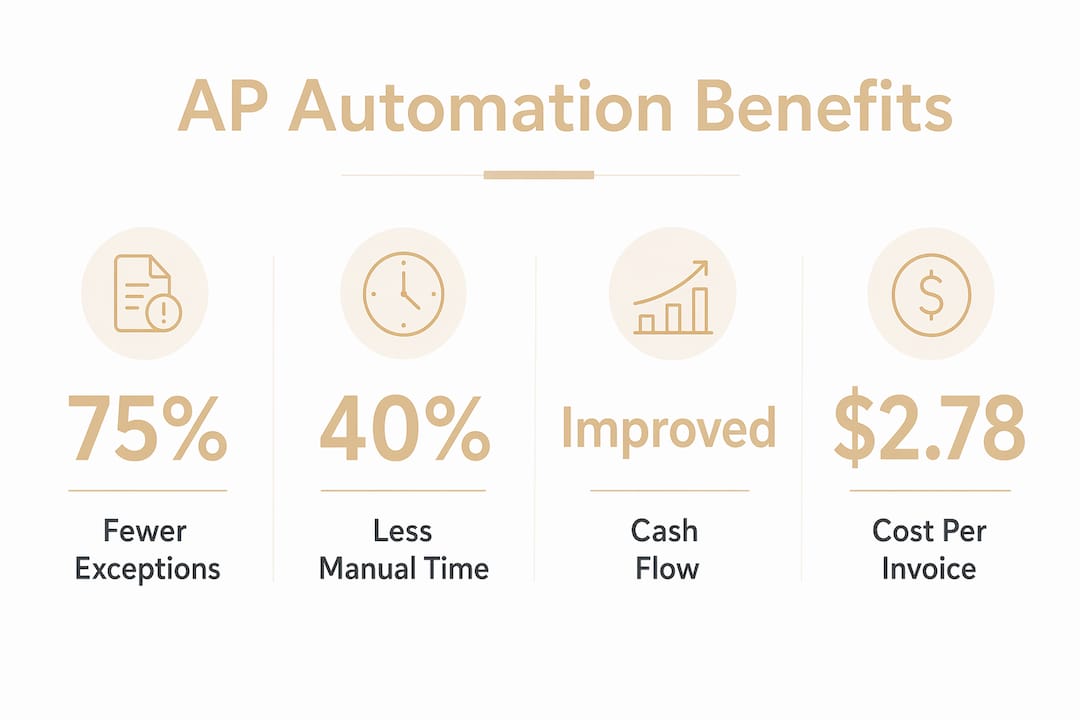
Accounts payable automation is a software-driven process that replaces manual invoice handling with a digital workflow covering capture, validation, approval, and payment. For Canadian SMEs managing tight margins and growing invoice volumes, the financial case is direct: processing costs drop from $12.88 to $2.78 per invoice after automation, a reduction of roughly 78%. That is not a marginal improvement. It is a structural shift in how your finance team operates. Automated accounts payable also shortens payment cycles, reduces errors, and gives you real-time visibility into cash flow, which is the kind of control that lets you plan rather than react.
What is accounts payable automation and how does it work?
Accounts payable automation uses a combination of artificial intelligence, optical character recognition (OCR), and workflow logic to move an invoice from receipt to payment without manual re-keying. Think of it as a mechanism built from interlocking parts: each stage triggers the next with precision, the way a well-calibrated clock advances one gear at a time.
The core components work in sequence:
- Invoice capture: AI-OCR scans incoming invoices, whether PDF, email, or paper, and extracts key fields such as vendor name, amount, and due date.
- Validation: The system checks extracted data against vendor records and flags anomalies before they enter your books.
- Invoice matching: The platform compares the invoice against a purchase order (2-way match), a receiving report (3-way match), or an inspection record (4-way match). The right match type depends on your procurement process.
- Approval routing: Invoices move through configurable approval chains based on amount, department, or vendor type. Exceptions get flagged for human review rather than stalling the queue.
- Payment and reconciliation: Approved invoices trigger payment and sync automatically with your accounting or ERP system.
Effective AP automation platforms incorporate AI-OCR for invoice capture, configurable matching logic, and workflow-driven approval routing to cover the full AP lifecycle. That integration is what separates genuine automation from simply digitising a paper form.
Pro Tip: Start with 3-way matching as your default. It catches the most common discrepancies between what was ordered, received, and billed, without adding the complexity of a 4-way process.

What are the measurable benefits of AP automation for SMEs?
The financial impact of AP process automation is well-documented and consistent across business sizes. Cycle time drops by 70% after implementation, meaning invoices that once took two to three weeks to process clear in days. That speed directly affects your ability to capture early payment discounts, which compound into meaningful savings over a fiscal year.
The operational gains are equally significant:
- 75% fewer processing exceptions, reducing the back-and-forth that consumes your team's time
- 40% reduction in manual processing time, freeing staff to handle higher-value tasks
- 60% more invoices processed monthly with the same headcount, using AI-powered tools
Automated AP departments experience 75% fewer processing exceptions and reduce manual process time by 40%, allowing teams to manage higher invoice volumes without adding staff. That means your finance team scales its output without scaling its payroll.
Cash flow visibility improves as well. When every invoice is tracked digitally from receipt to payment, you know exactly what is owed, when it is due, and where approvals are stalled. That clarity supports better forecasting and removes the guesswork from month-end accruals. AP automation transforms the function from a cost centre into a strategic hub for cash flow management, improving forecasting accuracy through AI.
For Quebec SMEs managing seasonal cash flow or project-based billing, that level of visibility is not a luxury. It is a competitive advantage.
Best practices for successful AP automation adoption
The most common reason AP automation projects fail is not the technology. Organizations automate broken processes instead of standardizing workflows first, which amplifies existing inefficiencies rather than correcting them. The mechanism only runs well when the parts are clean and properly aligned before assembly.
Follow these steps to set your implementation up correctly:
- Audit your current process. Map every step from invoice receipt to payment. Identify where delays, errors, and manual workarounds occur. You cannot fix what you have not measured.
- Clean your vendor data. Duplicate vendor records, inconsistent naming, and missing payment terms cause matching failures. Resolve these before you go live. Poor data quality and lack of process standardization cause most AP automation failures.
- Standardize invoice formats. Ask vendors to submit invoices in consistent formats. Even a basic template requirement reduces OCR errors significantly.
- Implement in phases. Begin with your highest-volume, lowest-complexity invoices. Achieve stable results there before expanding to exceptions and edge cases. Targeting 100% touchless processing from day one sets unrealistic expectations.
- Train your team on exception handling. Automation alone does not eliminate human involvement. Exceptions require human review to resolve anomalies and maintain accuracy. Your team needs to know when and how to intervene.
Pro Tip: Assign a dedicated AP automation owner internally, someone who understands both the finance workflow and the software configuration. Without clear ownership, exception queues pile up and the system loses trust.
How does AP automation integrate with accounting and ERP systems?
Integration is where many SMEs underestimate the complexity. Connecting your AP automation platform to an existing accounting system like QuickBooks, Xero, or NetSuite is not automatic. Verifying compatibility before selecting a platform avoids frustrating data-syncing issues after go-live.
The table below outlines the key integration considerations for common SME accounting environments:
| Integration factor | What to verify |
|---|---|
| Data sync direction | Confirm bidirectional sync so payments update both systems |
| Native vs. API connection | Native integrations are faster to deploy; APIs offer more control |
| Field mapping | Match invoice fields to your chart of accounts before launch |
| Duplicate detection | Confirm the system flags duplicate invoice numbers across both platforms |
| Audit trail | Verify that approval history and payment records are retained in both systems |
Native API-based integrations between AP automation and ERP or accounting systems are essential to eliminate double data entry and realise full ROI. Re-keying data between systems cancels out the time savings automation is meant to deliver.
Integration also strengthens compliance. When your AP platform and accounting system share a single data source, audit trails are complete and consistent. That matters during CRA reviews and year-end reporting, where gaps in documentation create risk.
How to transition from manual to automated accounts payable
Moving from a manual AP process to a fully automated one does not require a complete system overhaul. A phased approach keeps your operations running while you build the new mechanism alongside the old one.
- Measure your baseline. Record your current invoice volume, average processing time, cost per invoice, and error rate. These numbers become your benchmark for measuring ROI after implementation.
- Select software aligned with your budget and needs. Typical SMEs pay between $50 and $500 monthly for AP automation software and realise ROI within 3–6 months through cost savings and early payment discounts. Match the platform's feature set to your actual invoice complexity, not the most advanced option available.
- Prepare your data. Clean vendor records, standardize invoice templates, and document your approval hierarchy before configuration begins.
- Pilot with a controlled subset. Run automation on one vendor category or one department first. Measure accuracy, cycle time, and exception rates over 30–60 days.
- Scale and monitor KPIs. Once the pilot is stable, expand to your full invoice volume. Track cost per invoice, cycle time, and exception rate monthly. Adjust approval thresholds and matching rules as your data reveals patterns.
Organizations integrating AP automation with ERP systems reduce manual invoice processing from 14–18 days to 3–5 days, achieving a 65–80% cycle time improvement. That result is achievable for SMEs, but only when the transition is structured rather than rushed.
Connecting your invoice payment reminders to the same automated workflow closes the loop on both payables and receivables, giving you a complete picture of cash movement.
Key takeaways
Accounts payable automation delivers its strongest results when clean data, standardized workflows, and phased implementation work together from the start.
| Point | Details |
|---|---|
| Cost savings are immediate | Processing costs drop from $12.88 to $2.78 per invoice after automation. |
| Cycle time improves dramatically | Automated AP cuts invoice processing from weeks to 3–5 days with ERP integration. |
| Data quality determines success | Clean vendor records and standardized invoices must precede any automation rollout. |
| Human oversight remains necessary | Exception handling requires trained staff; automation does not replace financial judgement. |
| ROI arrives quickly | Most SMEs recover their software investment within 3–6 months of going live. |
Why AP automation is the quiet mechanism your finance team needs
I have worked with enough SME finance teams to know that the loudest problems are rarely the most expensive ones. A missed payment here, a duplicate invoice there. Each one feels manageable. The real cost is invisible: the hours spent reconciling, the cash flow surprises at month-end, the supplier calls that pull your team away from higher-value work.
What strikes me most about AP automation is not the efficiency gain, though that is real and measurable. It is the shift in what your finance team is actually doing. When the mechanical work is handled by a well-configured system, your people start asking better questions. They analyse payment terms instead of chasing approvals. They spot cash flow patterns instead of correcting data entry errors.
The teams I see struggle with automation are almost always the ones who skipped the process-standardization step. They automated chaos and got faster chaos. The ones who succeed treat the implementation like a watchmaker treats a movement: every component is clean, fitted, and tested before the case is closed.
My honest recommendation for Canadian SMEs in 2026 is this: do not wait until your invoice volume forces the issue. The cost of delay is not just inefficiency. It is the early payment discounts you are leaving on the table, the audit exposure from incomplete records, and the staff capacity you are burning on work a well-built system could handle in seconds.
AP automation is not a technology project. It is a financial decision. Treat it like one.
— Olivier
How Nexuradata helps Quebec SMEs automate financial operations
Nexuradata builds operational systems for Quebec SMEs that connect invoicing, approvals, and payment tracking into a single, readable workflow. The approach is not about replacing your existing tools. It is about making them work together the way they were always supposed to.
If your team is still processing invoices manually, or if your accounting system and AP workflow are not talking to each other, a structured assessment is the right first step. Nexuradata's operational assessment tool maps your current process, identifies the gaps, and outlines exactly where automation delivers the fastest return. For SMEs ready to move from reactive to deliberate financial management, the AI-powered services at Nexuradata are built to fit your scale, your budget, and your existing systems.
FAQ
What is accounts payable automation?
Accounts payable automation is a software process that digitises invoice capture, validation, matching, approval, and payment without manual data entry. It uses AI and OCR to extract invoice data and route it through configurable workflows.
How much does AP automation software cost for SMEs?
Most SMEs pay between $50 and $500 per month for AP automation software, depending on invoice volume and feature requirements. ROI typically arrives within 3–6 months through reduced processing costs and early payment discounts.
How long does it take to process invoices with automation?
Automated AP systems reduce invoice processing from 14–18 days to 3–5 days when integrated with an ERP or accounting system, a cycle time improvement of 65–80%.
Does automation eliminate the need for finance staff?
No. Exceptions, anomalies, and edge cases still require human review to maintain accuracy. Automation reduces the volume of manual work but does not replace financial judgement or oversight.
What accounting systems does AP automation integrate with?
Most AP automation platforms integrate with QuickBooks, Xero, and NetSuite through native connectors or APIs. Verifying compatibility and field mapping before implementation prevents data-syncing problems after go-live.