
Automating accounts payable is the process of using technology to digitize and manage invoice processing, approval routing, payment execution, and reconciliation without manual handling at each step. For Canadian SMEs, this shift matters because manual invoice processing costs roughly $12.88 per invoice, while automation brings that figure down sharply and achieves 99.95% accuracy through OCR capture. The industry term for this discipline is AP automation, and it covers everything from the moment an invoice arrives to the moment a payment clears. Finance teams that get this right gain faster cycle times, cleaner audit trails, and real financial visibility rather than a pile of paper chasing approvals.
What does automating accounts payable actually require first?
Most AP automation projects fail before any software is deployed. The failure point is almost always the same: teams automate a broken process and simply speed up the chaos.

Experts consistently warn against automating unstandardized or broken processes. The recommendation is to standardize invoice intake and approval routing to reflect your actual org chart before touching any technology. That means one designated email address or supplier portal for all incoming invoices, no exceptions. It also means a clean vendor master file with accurate payment terms, banking details, and contact records.
Three core technologies underpin any AP automation build:
| Tool category | Primary function | Where it fits |
|---|---|---|
| OCR and AI capture | Extracts invoice data from PDFs, scans, and emails | Invoice intake |
| Workflow engine | Routes approvals based on rules you define | Coding and approval |
| ERP connector | Syncs validated invoices with your accounting system | Payment and reconciliation |
Each layer depends on the one before it. An ERP connector cannot reconcile data that an OCR engine misread because the vendor name was inconsistent in your master file.
Pro Tip: Fix your process map before you evaluate any software. Draw the actual approval path your invoices follow today, including the informal steps people take when the official process breaks down. That map reveals where automation will help and where it will create new bottlenecks.
Cleaning vendor data first is the step most businesses skip. Businesses that skip it end up processing bad data faster, not better. Spend two weeks auditing your vendor master before you configure a single automation rule.
How to automate invoices: a step-by-step process for SMEs
AP automation follows a defined sequence. Each step feeds the next, and skipping one creates exceptions that require manual intervention downstream.
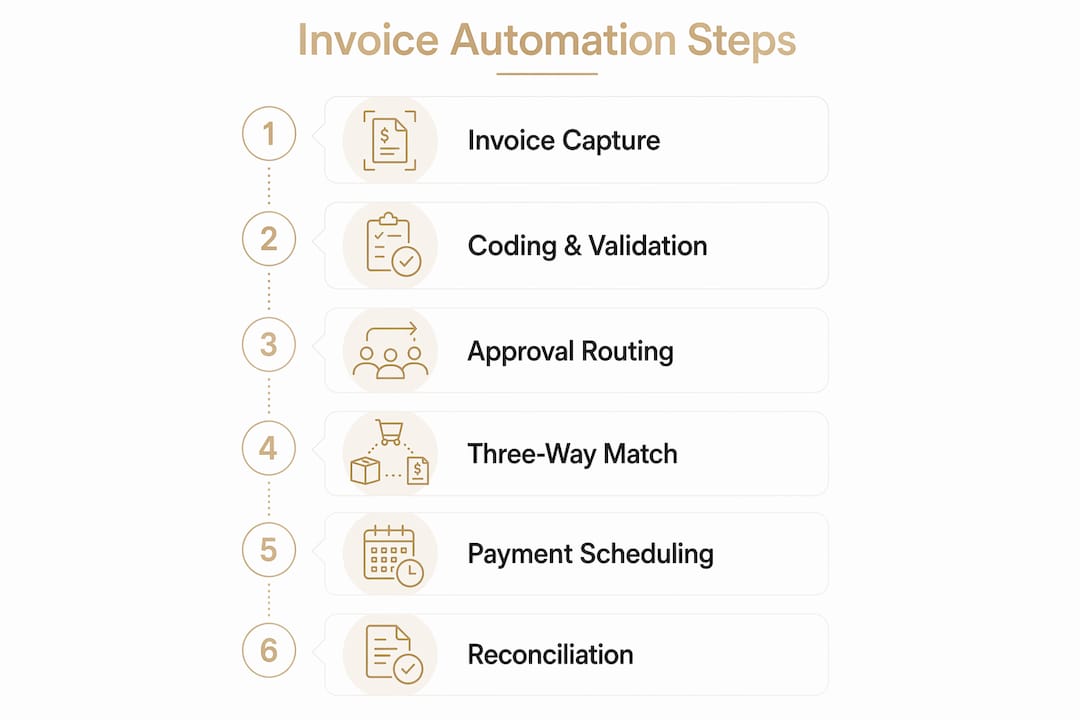
Step 1: Invoice capture All invoices enter through a single channel, whether that is a dedicated email inbox, a supplier portal, or an EDI feed. OCR software reads the document and extracts key fields: vendor name, invoice number, date, line items, and total. OCR systems cut processing time from 8 minutes per invoice to under 2 minutes. That time saving compounds across hundreds of invoices per month.
Step 2: Coding and validation The system applies GL codes and cost centre assignments based on rules you configure. Invoices from a known vendor with a standing purchase order get coded automatically. New vendors or unusual amounts trigger a review flag. Validation rules check for duplicate invoice numbers, missing fields, and amounts that fall outside expected ranges.
Step 3: Approval routing Routing rules send each invoice to the right approver based on amount thresholds, department, or project code. A $500 office supply invoice goes directly to an office manager. A $25,000 equipment invoice routes to the CFO. Effective approval routing reflects actual organizational structure, not a theoretical workflow drawn up two years ago. Review your routing rules every quarter.
Step 4: Three-way matching The system compares the invoice against the original purchase order and the goods receipt. All three must align on quantity, price, and vendor before the invoice moves to payment. This step catches billing errors and prevents overpayment without anyone manually pulling documents from a filing cabinet.
Step 5: Payment scheduling Approved invoices queue for payment based on due dates and early payment discount windows. Automated scheduling captures discounts that manual processes routinely miss because the invoice sat in someone's inbox too long. Automating these key steps reduces invoice cycle time from 14–18 days down to 3–5 days.
Step 6: Reconciliation Payment confirmations sync back to your accounting system automatically. Bank statements reconcile against the payment ledger without manual matching. Your books stay current in near real time rather than at month end.
Pro Tip: Configure your approval routing to include a delegate for every approver. When the primary approver is travelling or on leave, invoices should not sit idle. A missing delegate is one of the most common causes of payment delays in SME AP workflows.
You can also connect your internal approval workflows to your broader operational system so that payment approvals and client-facing tasks share the same visibility layer.
What goes wrong when you automate accounts payable?
AP automation does not eliminate problems. It surfaces them faster, which is only useful if you know what to look for.
The most common issue is data quality. Vendor names entered inconsistently across invoices, purchase orders, and your accounting system cause matching failures. The system flags these as exceptions, and someone must resolve them manually. The fix is a vendor data audit before go-live, not after.
Misaligned approval workflows are the second most frequent problem. When the routing rules in your system do not match how decisions actually get made in your business, invoices stall. A department head who left six months ago may still appear as an approver in the system. Outdated routing creates bottlenecks that are invisible until a supplier calls about a late payment.
Here are the most common troubleshooting steps for SME AP teams:
- Audit vendor master data monthly and remove or merge duplicate records
- Review approval routing rules every quarter against your current org chart
- Set escalation timers so invoices that sit unapproved for more than 48 hours trigger an alert
- Track your exception rate weekly; a rising rate signals a process problem, not a software problem
- Test your three-way matching tolerance settings; too tight and you generate false exceptions, too loose and errors slip through
Comprehensive AP automation reduces invoice exceptions by 75% when the underlying process is clean. That number drops significantly when teams automate without first fixing their intake and routing discipline.
AI-powered AP tools also detect fraud patterns that manual review misses, particularly duplicate payments and vendor impersonation. For SMEs with limited audit resources, this capability alone justifies the investment in a proper automation build.
How do you measure the success of AP automation?
The right metrics tell you whether your automation is working or just running. Tracking the wrong ones gives you a false sense of progress.
The four KPIs that matter most for SME AP teams are invoice cycle time, cost per invoice, exception rate, and early payment discount capture rate. Cycle time measures how many days pass between invoice receipt and payment. Cost per invoice captures total processing labour and overhead divided by invoice volume. Exception rate shows what percentage of invoices require manual intervention. Discount capture rate reveals how much early payment savings you are actually collecting versus what was available.
| KPI | Manual baseline | Automated target |
|---|---|---|
| Invoice cycle time | 14–18 days | 3–5 days |
| Cost per invoice | $10–$15 | As low as $3 |
| Exception rate | High, untracked | Reduced by up to 75% |
| Manual processing time | 8 minutes per invoice | Under 2 minutes |
An operational dashboard gives finance teams a live view of these metrics rather than a monthly report that is already out of date by the time anyone reads it.
Beyond efficiency, AP automation enables finance teams to move toward higher-value work like cash flow forecasting and spend analysis. That shift is the real return on investment. A finance manager who spends four hours a day chasing invoice approvals cannot spend those same hours analysing where the business is overpaying or identifying suppliers worth renegotiating.
Automation also allows business growth without proportional headcount increases. An SME processing 200 invoices per month can scale to 600 without adding AP staff, provided the underlying process is solid.
Key takeaways
Automating accounts payable delivers its full value only when process discipline comes before technology selection, and when teams track the right metrics from day one.
| Point | Details |
|---|---|
| Fix the process first | Standardize invoice intake and clean vendor data before deploying any automation software. |
| Follow the six-step sequence | Capture, code, route, match, schedule, and reconcile in order; skipping steps creates manual exceptions. |
| Track four core KPIs | Measure cycle time, cost per invoice, exception rate, and discount capture rate to confirm automation is working. |
| Align routing to reality | Approval rules must reflect your actual org chart today, not a workflow diagram from two years ago. |
| Automation enables strategic work | Finance teams freed from manual processing can focus on cash flow forecasting and spend control. |
Why AP automation is a process problem, not a software problem
I have worked with enough SME finance teams to say this plainly: the technology is rarely the obstacle. The obstacle is almost always the process that existed before anyone thought about automation.
When a team comes to me frustrated that their AP software is generating hundreds of exceptions every week, the root cause is never the software. It is a vendor master file that was never cleaned, or approval routing that still lists a manager who left the company. The software is doing exactly what it was configured to do. It is just configured around a broken process.
The teams that get the most from AP automation are the ones that treat the pre-implementation phase as seriously as the deployment itself. They map every step of their current process, including the workarounds people have built up over years. They audit their vendor data. They draw their actual approval chain, not the one on the org chart, but the one that happens in practice.
A hybrid model that combines in-house automation with third-party managed payment services can work well for SMEs that want visibility without taking on full reconciliation complexity. It is a legitimate middle ground, and it is underused. Most SMEs either try to do everything themselves or outsource too much and lose sight of their own cash position.
My honest advice: spend as much time on your process design as you do on your software evaluation. The right tool in the wrong process will not save you. A clear process with a modest tool will outperform a sophisticated platform built on chaos every time. When you are ready to choose an automation partner, bring your process map to that conversation. It will tell you more about your readiness than any demo ever will.
— Olivier
How Nexuradata helps SMEs build AP automation that actually works
Canadian SMEs often know they need to automate their accounts payable but are not sure where the gaps are in their current process. Nexuradata works with SMEs in Quebec to map existing workflows, identify where manual steps are creating delays or errors, and build automation structures that fit the actual business rather than a generic template.
Nexuradata's operational assessment is the starting point for most engagements. It surfaces the specific bottlenecks in your invoice workflow, approval routing, and payment reconciliation before any technology is selected. From there, Nexuradata helps implement the right automation layer, including automated invoice payment reminders and operational dashboards that keep your finance team informed without manual reporting. The goal is a payment process that runs like a well-calibrated mechanism, consistent, visible, and reliable.
FAQ
What is AP automation?
AP automation is the use of technology to manage invoice receipt, coding, approval, payment, and reconciliation without manual handling at each step. It replaces paper-based and email-driven workflows with rule-based digital processes.
How long does it take to automate accounts payable for an SME?
Implementation timelines vary by complexity, but most SMEs complete a foundational AP automation build within 6–12 weeks. The pre-implementation phase, including vendor data cleanup and process mapping, often takes as long as the technical setup.
What is the cost of processing an invoice manually versus automatically?
Manual invoice processing costs roughly $12.88 per invoice. Automation reduces that cost to as low as $3 per invoice while improving accuracy to 99.95%.
What should I fix before implementing invoice automation solutions?
Standardize your invoice intake to a single channel, clean your vendor master data, and map your actual approval workflow before selecting any software. Automating a broken process accelerates errors rather than eliminating them.
What KPIs should I track after automating accounts payable?
Track invoice cycle time, cost per invoice, exception rate, and early payment discount capture rate. These four metrics give a complete picture of whether your AP automation is delivering real operational improvement.